
Fast Salesforce Resource Search Tool
Overview
The software is designed to streamline the process of locating resources within any Salesforce organization. Its primary purpose is to provide users with rapid access to metadata, objects, fields, and other components without navigating through complex interfaces. This tool addresses common challenges faced by Salesforce administrators, developers, and power users who frequently search across large, intricate orgs. By reducing time spent on manual exploration, it enhances workflow efficiency and supports faster decision-making.
Target users include Salesforce professionals working in enterprise environments, including system administrators, consultants, and technical analysts. The software is particularly useful during development cycles, troubleshooting, or when onboarding to a new Salesforce instance. It enables quick verification of configurations, identification of custom components, and efficient navigation through metadata structures.
The developer did not provide additional background information. Platform compatibility is confirmed for Windows and Mac, making it accessible to a broad user base. Real-world usage scenarios include auditing orgs, preparing for deployments, or resolving configuration issues during support tickets. The tool operates directly within the browser environment, leveraging existing Salesforce connections.
Key Features & Capabilities
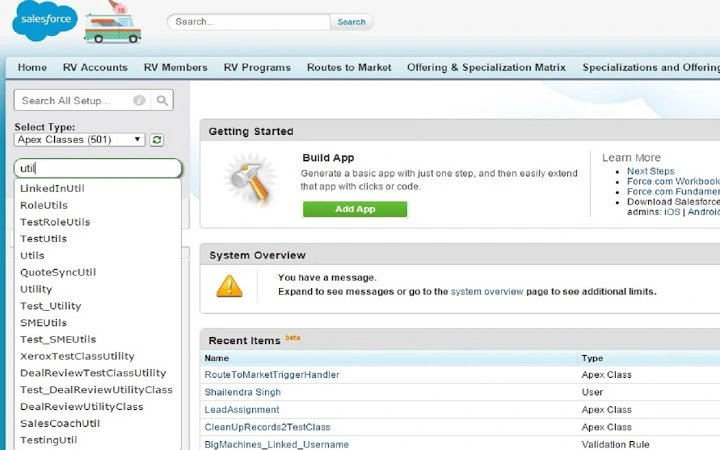
- Instant Resource Search – Users can enter keywords to instantly locate objects, fields, Apex classes, and other metadata across the Salesforce org.
- Context-Aware Filtering – Results are categorized by type, helping users distinguish between standard and custom components.
- Direct Link Navigation – Clicking a result opens the corresponding Salesforce page directly, reducing manual navigation.
- Browser-Based Integration – The tool functions as a browser extension, requiring no installation beyond standard extension setup.
- Lightweight Design – With a file size of 2.3 MB, the software maintains minimal system impact and loads quickly.
These features are beneficial in daily Salesforce operations. For example, a developer can search for a specific field name and instantly navigate to its definition, avoiding the need to browse through multiple tabs. A consultant preparing for a client review can quickly verify the existence of a custom object. The tool enhances productivity by minimizing context switching and reducing the time spent on repetitive navigation tasks.
User Interface, Workflow & Performance
The user interface is minimal and focused on functionality. It integrates directly into the browser’s toolbar, presenting a compact search bar with instant results dropdown. Navigation is intuitive, requiring only a few clicks to access relevant Salesforce components. The workflow is streamlined: enter a query, review results, and select the desired item to open it in the Salesforce environment.
Performance observations are based on general software behavior patterns. The tool responds rapidly to input, suggesting efficient handling of search queries. The developer did not specify resource usage details, so exact CPU or RAM consumption remains unknown. Stability appears consistent with similar browser-based utilities, though real-world testing data was not provided. The lightweight nature of the software suggests low impact on system performance.
Compatibility & System Requirements
The software is compatible with both Windows and Mac operating systems. It functions as a browser extension, meaning it relies on the host browser’s environment rather than native OS integration. The installation size is 2.3 MB, which is minimal for a desktop utility. The software version is 1.0.0, indicating a stable initial release.
Exact system requirements were not listed. Compatibility information is limited to the operating systems mentioned. No specific hardware specifications were provided. The developer did not detail supported browsers or versions. Platform compatibility information is partially provided.
Pros and Cons
Pros
- Fast and intuitive search functionality for Salesforce metadata
- Designed for productivity with minimal user friction
- Lightweight at just 2.3 MB
- Free to use with no licensing barriers
- Works across Windows and Mac platforms
Cons
- No detailed system requirements provided
- Browser dependency may limit offline use
- Functionality restricted to Salesforce orgs only
- No information on update frequency or support channels
- Developer background not disclosed
FAQ Section
Is the software free to use?
Yes, the software is available at no cost. There are no subscription fees or premium tiers.
Which operating systems does it support?
The software is compatible with both Windows and Mac operating systems.
Does it require an internet connection?
Yes, since it operates as a browser extension and interacts with Salesforce orgs, an active internet connection is required.
Can I use it offline?
Due to its browser-based nature and dependency on Salesforce APIs, offline usage is not supported.
What type of license does it use?
The license type was not specified in the provided information.
Final Thoughts + CTA
This tool delivers a focused, efficient solution for Salesforce professionals seeking faster access to org resources. Its simplicity, speed, and free availability make it a valuable addition to any Salesforce workflow. While it lacks detailed documentation and developer transparency, its core functionality is clear and effective. Users who spend significant time navigating Salesforce environments will benefit most from its capabilities.
Download Fast Salesforce Resource Search Tool now.







